Arches National Park App Creation
Overview
The Process
High-Fidelity Prototype
Challenges
Conclusion
Skills Gained
For one of my classes, I was tasked to design a mobile app for a National Park of my choice. I decided to go with Arches National Park and wanted to enhance the user's experience on the app as well as in the park. My goal was to create a visually engaging, user-center design that was both intuitive and functional.
To start off the project, I gathered my ideas and started to create a user persona. This user persona would help direct me on how to create a user-centered design for this mock user. As I did more research to come up with the “perfect” user that represented the majority of users, I was presented with a problem; the visitor base to Arches National Park is very wide and diverse. I found there was no specific age group for visitors which led me to a problem. How was I to design without knowing what age group I was designing for? As I pushed myself to overcome this setback, I knew that because the age group was very diverse, I needed to make something very simple and accessible for all ages, not just the younger and more tech-savvy generation.
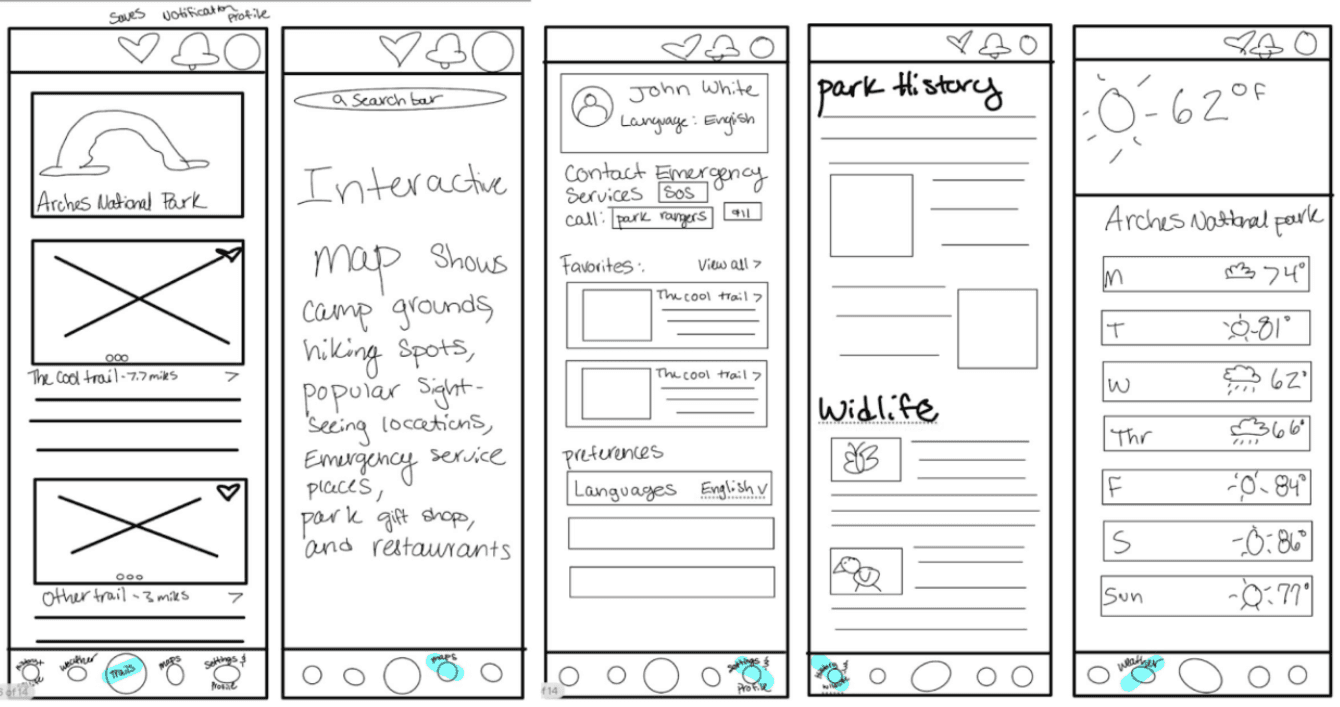
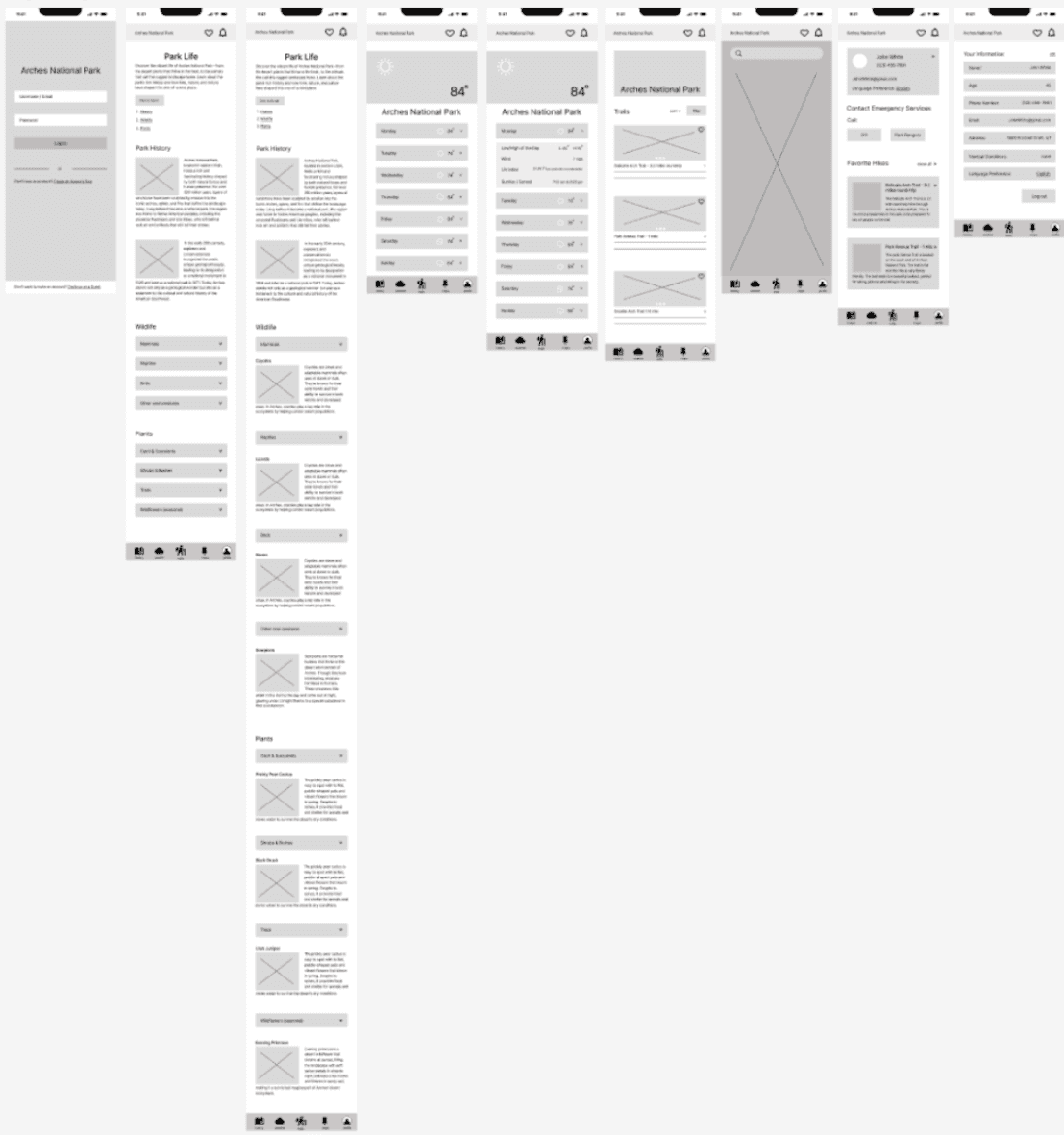
This led me to sketch out ideas and eventually turn them into wireframes on Figma. Here are my sketches and wireframes:
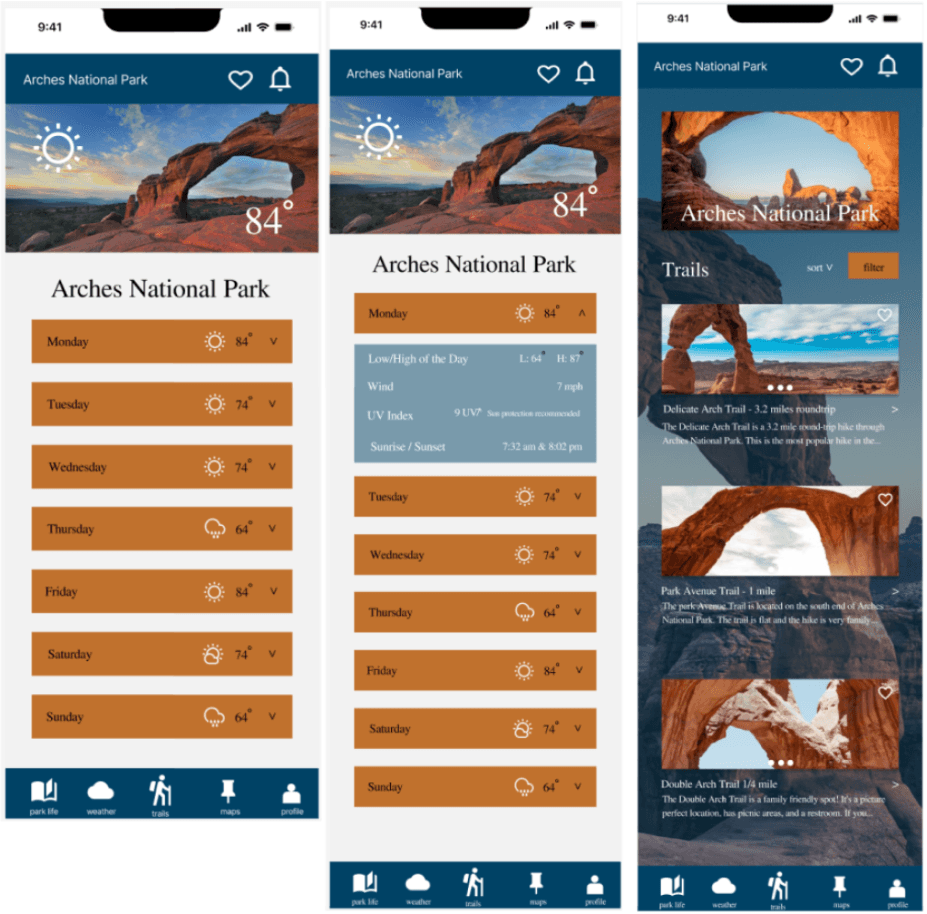
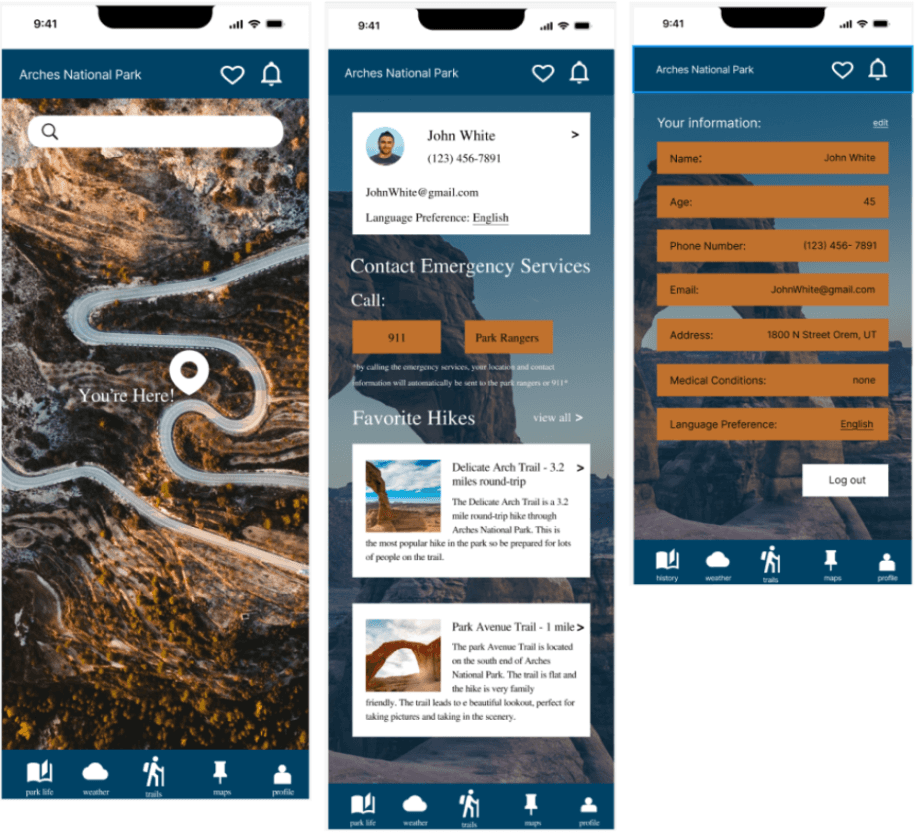
After creating my wireframes, I then made my surface comps and eventually my high-fidelity prototype. In the process of making a working prototype, I struggled with getting certain components and buttons to work properly which proved to be very challenging.
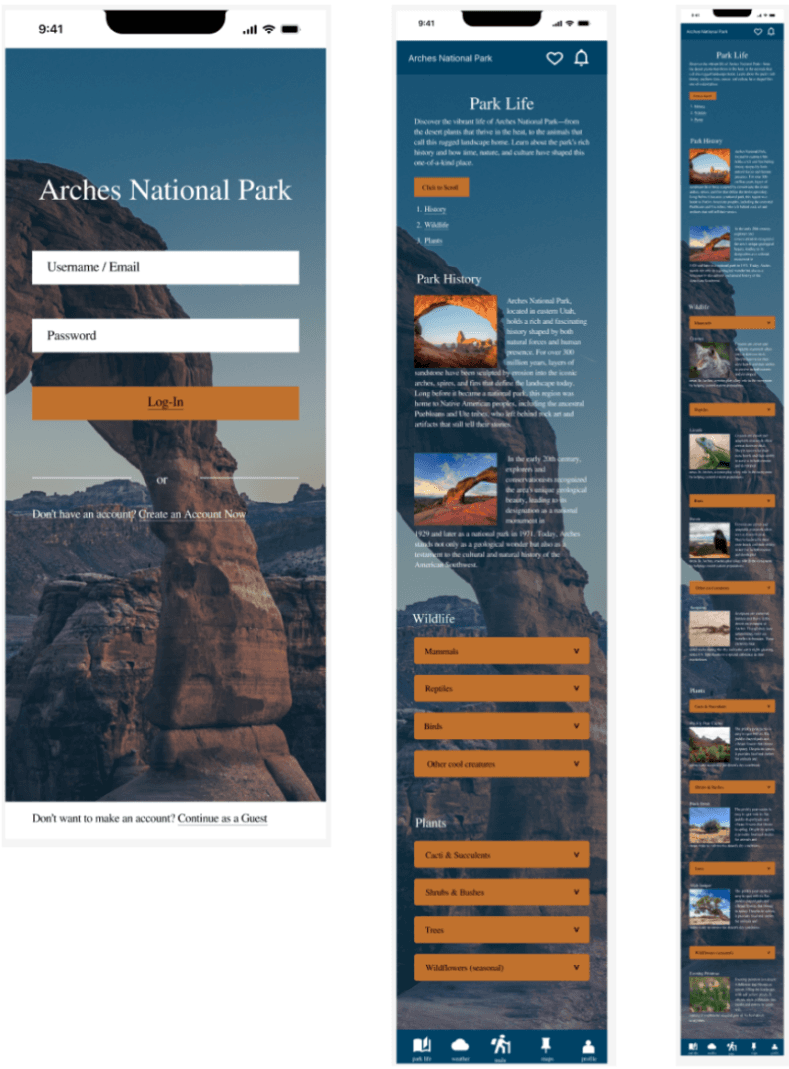
Here are my surface comps:
I wanted to make an interactive map you could scroll around on and zoom in and out of, but I was unable to do so. I tried watching videos and looking up tutorials on how to do this but with much effort I was unable. Although I was unable to get certain things working on my prototype, I still learned valuable skills in making one. I learned how much time goes into it, the process of completely one, and how exact you need to be when creating one. I feel the skills I gained from this project will help me in my future career as a designer.
This project allowed me to apply all of my design skills as well as critical thinking skills. I was able to explore a real-world challenge and find issues the user faced and solve them. Something I enjoyed was building an app that is both functional and visually engaging. I felt the app was easily accessible and very straight forward for all users allowing it to be user-friendly.
Throughout the process, I was able to create a user-centered design by thinking critically about how a user would navigate the app as well as how they would use it. I focused on intuitive navigation, clear visuals, and meaningful content to ensure users of all backgrounds would be able to use the app freely. As a result, I feel the app prototype could be handed off to a developer and eventually be used as a working product.
One of the parts I enjoyed the most was creating the surface comps. I loved playing around with making different designs and using different colors to see which colors look best as well as which colors had the most contrast and let the user read the content easefully. This stage of the project gave me a lot of creative freedom to choose and experiment with different spacing, layouts, and color choices that reflected the desert landscape of Arches National Park.
Overall, this project helped strengthen my skills as a designer and my critical thinking skills. It taught me how to solve real-world problems and create a solution. I felt I was able to focus a lot on usability over aesthetics, which really challenged me but also made me realize how important it is as a web designer.
Figma
Wireframing
Mobile Phone Responsiveness
Prototyping
App Creation

Arches National Park App Creation
Overview
The Process
High-Fidelity Prototype
Challenges
Conclusion
Skills Gained
For one of my classes, I was tasked to design a mobile app for a National Park of my choice. I decided to go with Arches National Park and wanted to enhance the user's experience on the app as well as in the park. My goal was to create a visually engaging, user-center design that was both intuitive and functional.
To start off the project, I gathered my ideas and started to create a user persona. This user persona would help direct me on how to create a user-centered design for this mock user. As I did more research to come up with the “perfect” user that represented the majority of users, I was presented with a problem; the visitor base to Arches National Park is very wide and diverse. I found there was no specific age group for visitors which led me to a problem. How was I to design without knowing what age group I was designing for? As I pushed myself to overcome this setback, I knew that because the age group was very diverse, I needed to make something very simple and accessible for all ages, not just the younger and more tech-savvy generation.
This led me to sketch out ideas and eventually turn them into wireframes on Figma. Here are my sketches and wireframes:
After creating my wireframes, I then made my surface comps and eventually my high-fidelity prototype. In the process of making a working prototype, I struggled with getting certain components and buttons to work properly which proved to be very challenging.
Here are my surface comps:
I wanted to make an interactive map you could scroll around on and zoom in and out of, but I was unable to do so. I tried watching videos and looking up tutorials on how to do this but with much effort I was unable. Although I was unable to get certain things working on my prototype, I still learned valuable skills in making one. I learned how much time goes into it, the process of completely one, and how exact you need to be when creating one. I feel the skills I gained from this project will help me in my future career as a designer.
This project allowed me to apply all of my design skills as well as critical thinking skills. I was able to explore a real-world challenge and find issues the user faced and solve them. Something I enjoyed was building an app that is both functional and visually engaging. I felt the app was easily accessible and very straight forward for all users allowing it to be user-friendly.
Throughout the process, I was able to create a user-centered design by thinking critically about how a user would navigate the app as well as how they would use it. I focused on intuitive navigation, clear visuals, and meaningful content to ensure users of all backgrounds would be able to use the app freely. As a result, I feel the app prototype could be handed off to a developer and eventually be used as a working product.
One of the parts I enjoyed the most was creating the surface comps. I loved playing around with making different designs and using different colors to see which colors look best as well as which colors had the most contrast and let the user read the content easefully. This stage of the project gave me a lot of creative freedom to choose and experiment with different spacing, layouts, and color choices that reflected the desert landscape of Arches National Park.
Overall, this project helped strengthen my skills as a designer and my critical thinking skills. It taught me how to solve real-world problems and create a solution. I felt I was able to focus a lot on usability over aesthetics, which really challenged me but also made me realize how important it is as a web designer.
Figma
Wireframing
Mobile Phone Responsiveness
Prototyping
App Creation
Arches National Park App Creation
Overview
The Process
High-Fidelity Prototype
Challenges
Conclusion
Skills Gained
For one of my classes, I was tasked to design a mobile app for a National Park of my choice. I decided to go with Arches National Park and wanted to enhance the user's experience on the app as well as in the park. My goal was to create a visually engaging, user-center design that was both intuitive and functional.
To start off the project, I gathered my ideas and started to create a user persona. This user persona would help direct me on how to create a user-centered design for this mock user. As I did more research to come up with the “perfect” user that represented the majority of users, I was presented with a problem; the visitor base to Arches National Park is very wide and diverse. I found there was no specific age group for visitors which led me to a problem. How was I to design without knowing what age group I was designing for? As I pushed myself to overcome this setback, I knew that because the age group was very diverse, I needed to make something very simple and accessible for all ages, not just the younger and more tech-savvy generation.
This led me to sketch out ideas and eventually turn them into wireframes on Figma. Here are my sketches and wireframes:
After creating my wireframes, I then made my surface comps and eventually my high-fidelity prototype. In the process of making a working prototype, I struggled with getting certain components and buttons to work properly which proved to be very challenging.
Here are my surface comps:
I wanted to make an interactive map you could scroll around on and zoom in and out of, but I was unable to do so. I tried watching videos and looking up tutorials on how to do this but with much effort I was unable. Although I was unable to get certain things working on my prototype, I still learned valuable skills in making one. I learned how much time goes into it, the process of completely one, and how exact you need to be when creating one. I feel the skills I gained from this project will help me in my future career as a designer.
This project allowed me to apply all of my design skills as well as critical thinking skills. I was able to explore a real-world challenge and find issues the user faced and solve them. Something I enjoyed was building an app that is both functional and visually engaging. I felt the app was easily accessible and very straight forward for all users allowing it to be user-friendly.
Throughout the process, I was able to create a user-centered design by thinking critically about how a user would navigate the app as well as how they would use it. I focused on intuitive navigation, clear visuals, and meaningful content to ensure users of all backgrounds would be able to use the app freely. As a result, I feel the app prototype could be handed off to a developer and eventually be used as a working product.
One of the parts I enjoyed the most was creating the surface comps. I loved playing around with making different designs and using different colors to see which colors look best as well as which colors had the most contrast and let the user read the content easefully. This stage of the project gave me a lot of creative freedom to choose and experiment with different spacing, layouts, and color choices that reflected the desert landscape of Arches National Park.
Overall, this project helped strengthen my skills as a designer and my critical thinking skills. It taught me how to solve real-world problems and create a solution. I felt I was able to focus a lot on usability over aesthetics, which really challenged me but also made me realize how important it is as a web designer.
Figma
Wireframing
Mobile Phone Responsiveness
Prototyping
App Creation